Enable Discounts with Incentivised Payments
Last updated 23 days ago
This feature gives you another way to manage payment costs by encouraging customers to choose your preferred, lower-cost payment methods.
You can offer customers a percentage discount when they pay using selected methods such as PayID, PayTo or Direct Debit. This can be particularly useful following recent changes to card surcharging, giving you a way to encourage lower-cost payment options while still giving your customers a choice in how they pay.
At checkout, customers will see “Save $X.XX” beneath any payment method you've chosen to discount. If they select that method, the discount is automatically applied to the total they confirm and pay.
To set this up, go to:
Settings on the left hand side menu panel > Payment Settings > Reduce Fees
From here, you can set a discount percentage and choose which payment methods you'd like it to apply to.
Set a discount between 0% and 10%. The default is 1%.
Choose from PayID, PayTo and Direct Debit. All three are selected by default.
Card and BPAY payments are not eligible for discounts.
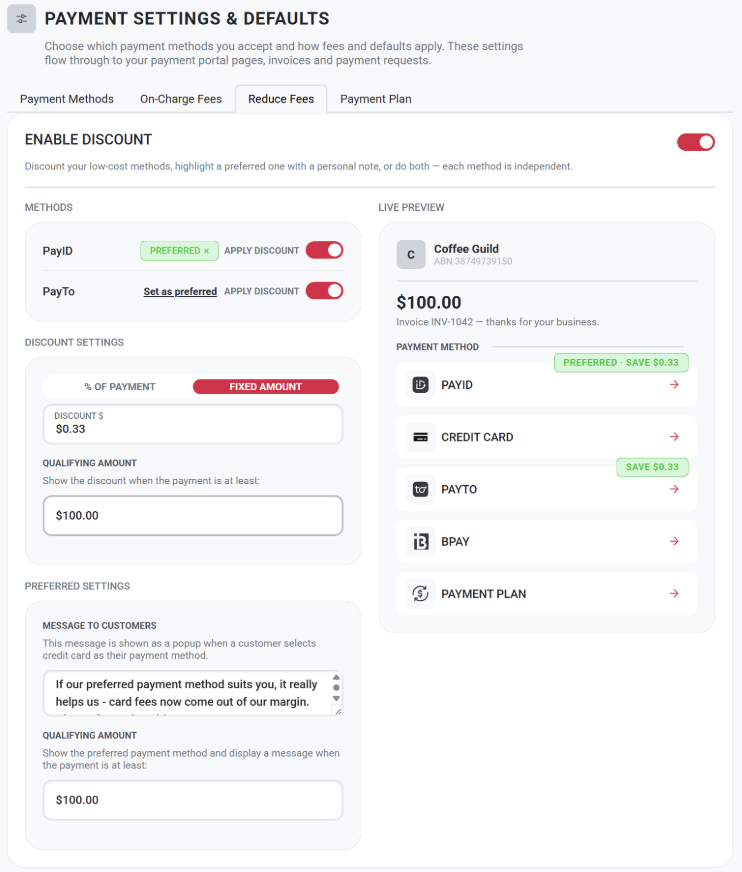
Choose how you encourage customers
You can customise how each payment method is presented to your customers. You can:
Discount your lower-cost payment methods to give customers a financial incentive to use them.
Highlight a preferred payment method and add your own message to help guide customers towards that option.
Use both a discount and a preferred payment method together.
Each payment method can be configured independently, giving you control over which options you want to encourage based on what works best for your business.
Was this helpful?
Still need help? Ask the team