Create a Recurring Direct Debit Template
Last updated 3 days ago
Recurring Direct Debit Templates allow you to save commonly used payment arrangements and reuse them when creating new direct debits. Templates can also be shared through your Payment Portal, enabling customers to set up their own direct debits using templates you have already configured.
Complete the template details to define how recurring direct debits created from this template will behave.
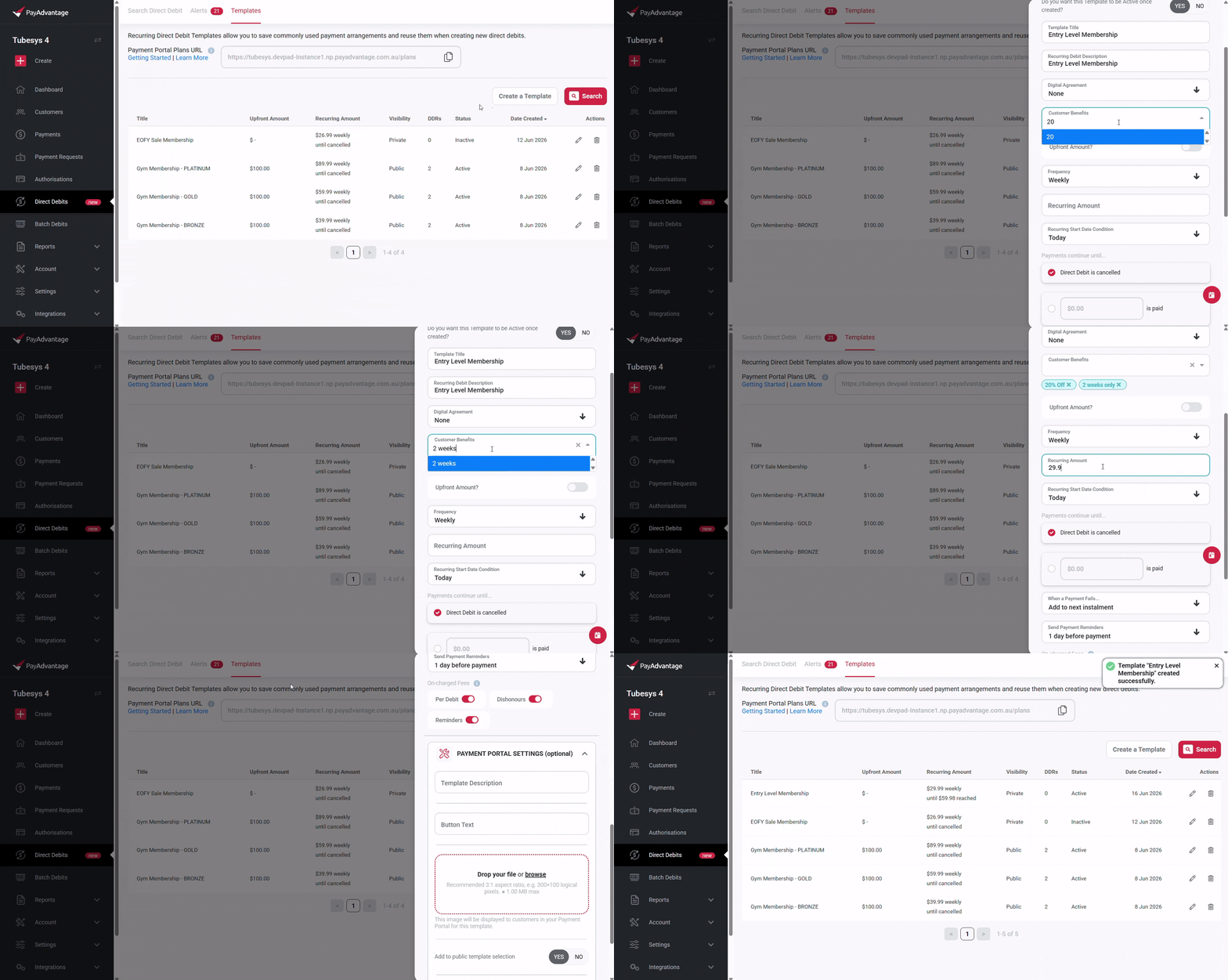
Required fields
Template settings
Template Title – The name used to identify the template.
Active – Determines whether the template is available for creating new direct debits.
Recurring direct debit settings
Recurring Debit Description – The description displayed against direct debits created from this template.
Frequency – How often payments will be collected.
Recurring Amount – The amount to be debited on each payment cycle.
Recurring Start Date Condition – When the recurring schedule begins.
End Condition – Choose whether payments continue indefinitely or end after a fixed period.
Payment Failure Condition – Defines what happens when a payment attempt fails.
Payment Reminder Setting – Controls the sending of payment reminders.
On-charged Fees – Configure any fees passed on to the payer.
Optional fields
Upfront payment
Both fields must be configured together if an upfront payment is required.
Upfront Amount
Upfront Start Condition
Digital agreement
Digital Agreement – Attach a digital agreement to the template. See: Digital Agreements.
Payment portal settings (Optional)
These settings control how the template appears in your Payment Portal, allowing you to present payment plans with customised descriptions, benefits, images, and call-to-action text for your customers.
Template Description
Button Text
Template Image
Visibility – Controls whether the template appears in your public template section.
Recommended Status
Benefits
These templates can be used to create new direct debits, both paper form and digital. If a template has a digital agreement attached to it, the template cannot be used to create new paper form direct debits.
Template Details Page
After creating a template, you can view its details page to manage the template, share it with customers, and review its history.
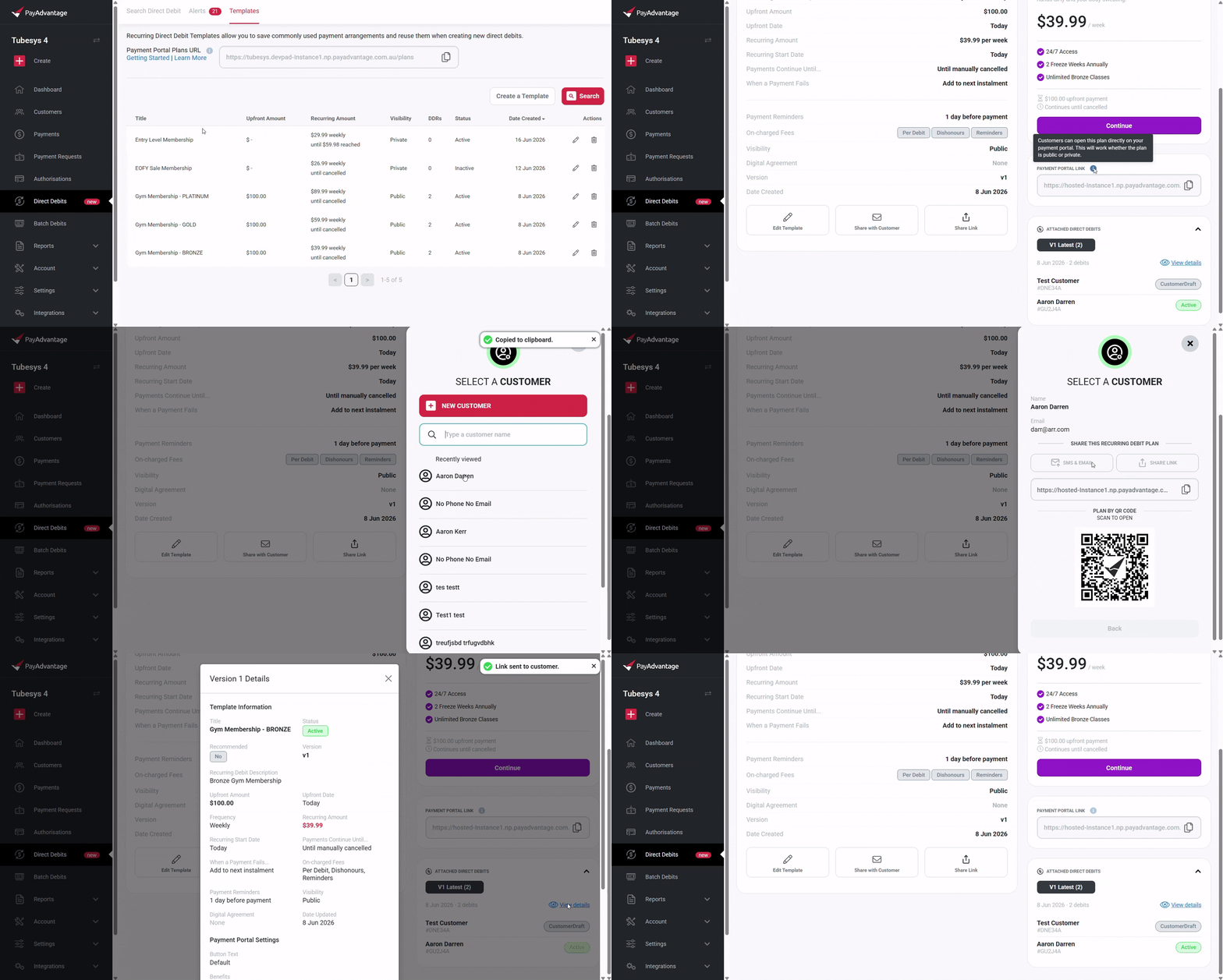
Template Preview
When viewing your new template's details, you will find a preview showing how the template will appear to customers on your Payment Portal, including any descriptions, benefits, images, and custom button text you have configured.
Share Template Link
A generic share link is available for each template. You can share this link with customers to direct them to a Payment Portal page containing only that template.
Customers can use this to set up their own direct debits using that template's information. See more: View All Recurring Direct Debit Templates.
Share with Customer
To share a template with a specific customer, select Share with Customer and choose either a new or existing customer. This allows the customer to skip the customer setup step when completing the direct debit setup process.
This link is encoded with a secure, temporary token (STP) that identifies the customer. This token helps protect saved payment arrangements, should there be any, and can ensures the link can only be used in the intended context.
Template Versions and History
The details page displays all versions of the template, along with the attached direct debits.
Select View details on a version to review its configuration.
Was this helpful?
Still need help? Ask the team