Changelog

Follow new updates and improvements to Pay Advantage.

Release 11.12

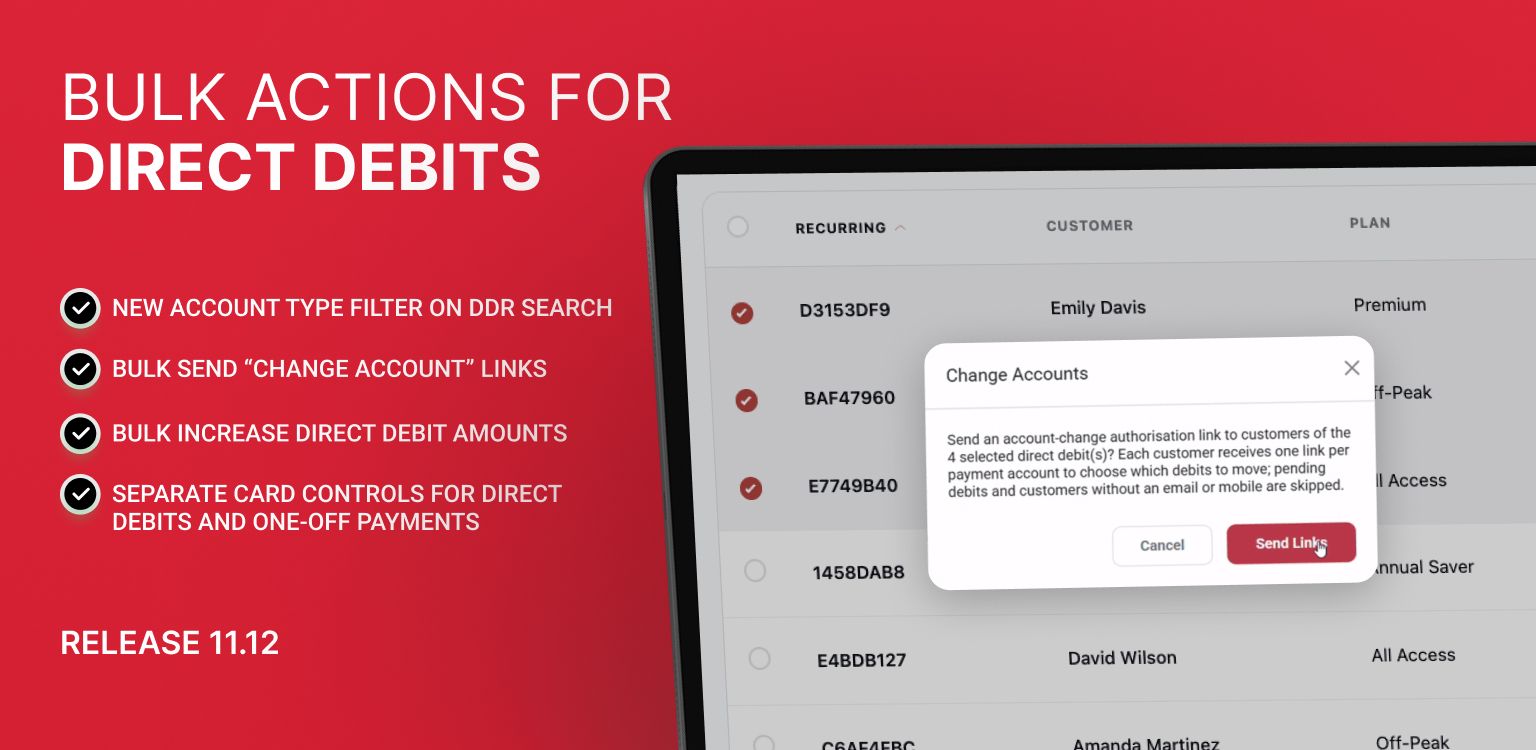
🌟 NEW: Bulk Actions for Direct Debits 🌟

Bulk Send “Change Account” Links

You can now send payment-detail update links to multiple customers at once directly from the Direct Debits page under Bulk Actions → Change Accounts.

This triggers an automated email or text via Pay Advantage allowing customers to easily move their recurring payments to a new payment method.

  • Email Grouping: If a customer has multiple direct debits linked to the same payment account, Pay Advantage consolidates them into a single email. The link allows the customer to choose which of their direct debits to update.

  • Automated Exception Handling: Accounts that cannot be actioned (such as those pending re-authorization, missing contact details, or already cancelled) are automatically skipped, and a summary report is generated.

  • New Account Type Filter: Easily target card payments using the new Payment Account Type search filter (Bank Account vs. Credit Card). This filter also applies to your CSV exports.

  • Why it matters: This makes it effortless to migrate existing recurring customers away from credit cards and onto lower-cost bank account payments ahead of the October 2026 surcharge changes.


Bulk Increase Direct Debit Amounts

You can now bulk-update recurring payment amounts across multiple direct debits directly from Bulk Actions → Adjust Amount. Update amounts by a percentage (up to 10%) or by a fixed dollar amount.

  • Customer Notifications: You can choose whether or not to send our automated email notification to affected customers.

  • Template Detachment Warnings: If a direct debit is currently linked to a template, updating it via bulk action will detach it from that template. Clear warnings are provided before applying changes, and a new Attached to a Template search filter helps you filter these out beforehand. The correct procedure for bulk amount adjustments for template attached debits is to update at the template level. To find out more, view this article.

  • Smart Exclusions: Direct debits that would exceed processing limits, or require re-authorization, are automatically excluded from selection. Any items that cannot be adjusted are skipped and reported without interrupting the rest of the batch.

  • API Support: Developers and API users can also execute bulk adjustments using our new public endpoint. See more here.

For more information about Direct Debit Bulk Actions, see this help article.


Uplifted Payment Settings

Separate Card Controls for Direct Debits and One-Off Payments

We’ve upgraded the Credit / Debit Card control in Settings → Payment Settings & Defaults → Payment Methods by splitting it into two independent switches:

  1. Direct Debit Authorizations

  2. Payment Portal (Invoices, Payment Requests, and One-Off Checkouts)

This gives you granular control over where card payments are accepted. For example, you can keep credit cards enabled for one-off portal payments while turning them off for recurring Direct Debit links (or vice versa).

  • Existing Settings Preserved: Your current card preferences remain active across both flows, so nothing changes until you choose to adjust the new switches.

  • Amount Caps: If you set a Max Amount cap for credit card payments, it will apply across both flows whenever enabled.

Release 11.11

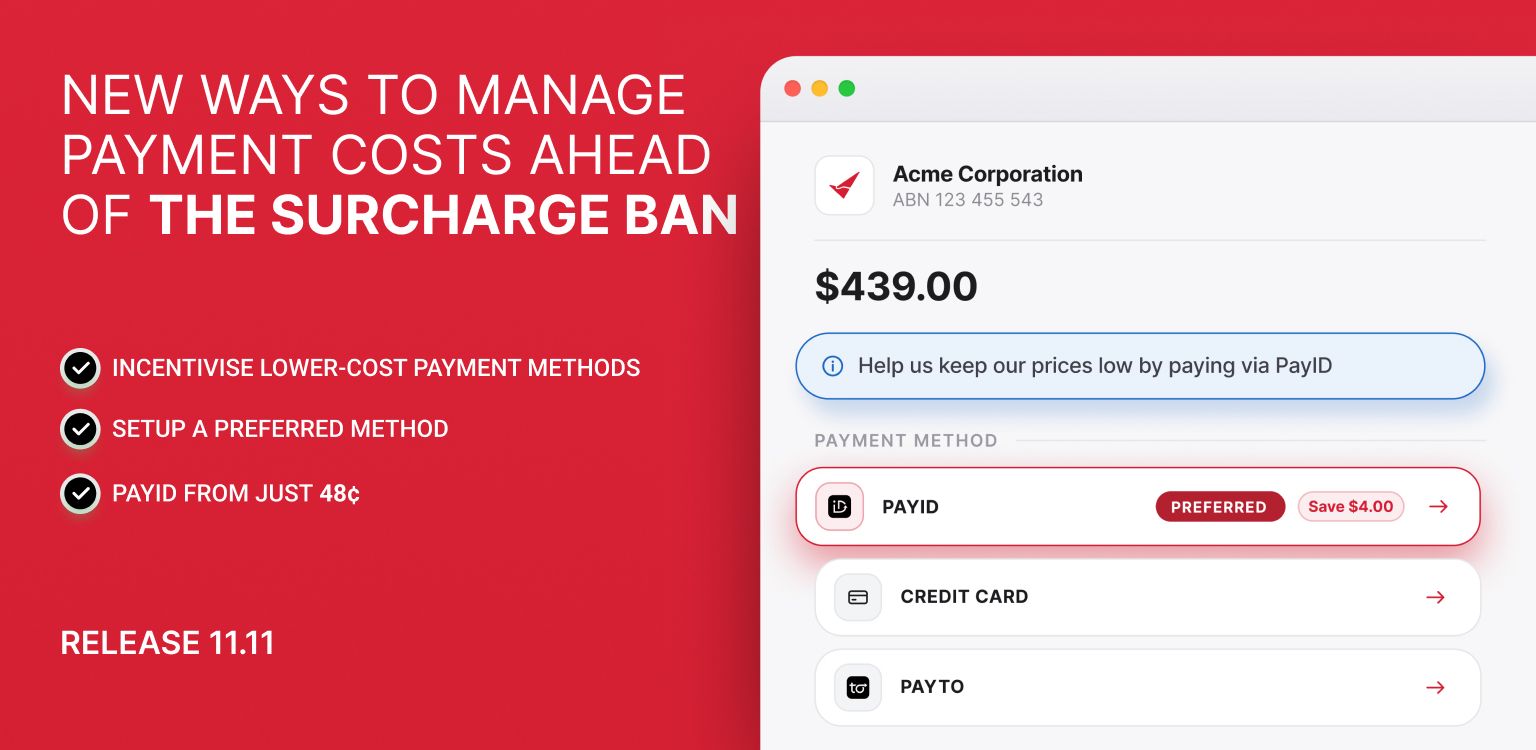
New ways to manage payment costs ahead of the surcharge ban

From 1 October 2026, businesses will no longer be able to surcharge customers for credit and debit card payments.

We've released new tools to give you more control over how customers pay and help you reduce the impact of these changes on your business.

For an overview of the different ways you can reduce your payment costs, view our surcharge ban guide here.

To understand more about the surcharge ban and what is changing, read our blog here.


🌟 NEW: Incentivise lower-cost payment methods 🌟

We've added Payment Incentives to the Reduce Fees tab.

Payment Incentives allow you to offer customers a discount when they choose PayID or PayTo on a Payment Request or through your Payment Portal.

This gives you another way to encourage customers towards payment methods that cost your business less to accept.

For example, your business may decide to increase its pricing to account for absorbing card processing costs, but then offer a 1% discount when a customer chooses a lower-cost payment method.

See the savings on an example $500 payment:

Credit card
$500 payment − $9.35 processing fee
Customer Pays: $500, You receive: $490.65

PayID with a 1% customer discount
$500 payment − $5 discount − $0.48 processing fee
Customer Pays: $495, You receive: $494.52.

In this example, the customer saves $5 and your business receives $3.87 more than it would from the card payment. You both win!

This allows you to give customers a genuine incentive to choose a cheaper way to pay while also reducing your overall payment costs.

Uplifted Payment Settings & Defaults

We've brought your account-level payment settings together into one place.

Go to Settings → Payment Settings & Defaults, where you'll now find tabs for:

  • Reduce Fees

  • On-Charge Fees

  • Payment Methods

  • Payment Plans

More control over when you accept credit cards

The Payment Methods tab replaces the previous Defaults screen and allows you to choose which payment methods you want to offer customers.

We've also added an amount limit for credit card payments.

This allows you to continue offering cards for smaller payments while directing larger payments towards lower-cost options such as PayID or bank account payments.

For example, you could set a $500 credit card limit. Customers paying $500 or less can still choose to pay by card, while customers paying more than $500 will be offered your other enabled payment methods.

This can make a significant difference because card processing fees generally increase with the size of the payment, while methods such as PayID have a low fixed fee.

Important: These settings are defaults for new items only. Existing invoices and payment requests will continue to use the payment methods they were created with.

Easier Payment Plan settings

We've also uplifted the Payment Plan settings, making it easier to control when payment plans are offered and the options available to your customers.

Payment plans can provide another way to manage larger payments by allowing customers to pay over time rather than requiring the full amount to be paid by card at once.

Updated On-Charge Fee settings

The On-Charge Fees tab has been reorganised to make your fee settings easier to manage. Fees are now grouped into:

  • Processing Fees

  • Direct Debit Admin Fees

  • Payment Request Fees

From 1 October 2026, Pay Advantage will automatically remove the ability to on-charge processing fees for card payments.

You can still choose to on-charge eligible fees for other payment methods, including bank account and PayID payments.

HINT: Combined with the new Payment Methods settings, this gives you more control over your approach. For example, you could disable credit cards and only offer payment methods where eligible processing fees can continue to be on-charged.


Upcoming Features

Bulk Direct Debit changes

We're also working on new bulk tools to help businesses manage existing Direct Debit Requests (DDRs) ahead of the surcharge changes.

You'll be able to:

  • Increase DDR payment amounts by a percentage — useful where you need to adjust your pricing to account for card processing costs that can no longer be surcharged.

  • Send Change Account links in bulk — allowing customers currently paying by credit card to easily move to a bank account payment.

HINT: Combined with the ability to disable credit cards, sending out change account links will give your business the option to continue to on-charge payment fees and move existing recurring customers away from card payments and towards lower-cost bank account payments.

Release 11.10

What’s New in Pay Advantage

We’ve added a range of new features designed to help you get paid faster, spend less time following up customers and have more control over how you collect payments.

Here’s what’s now available in your Pay Advantage account.

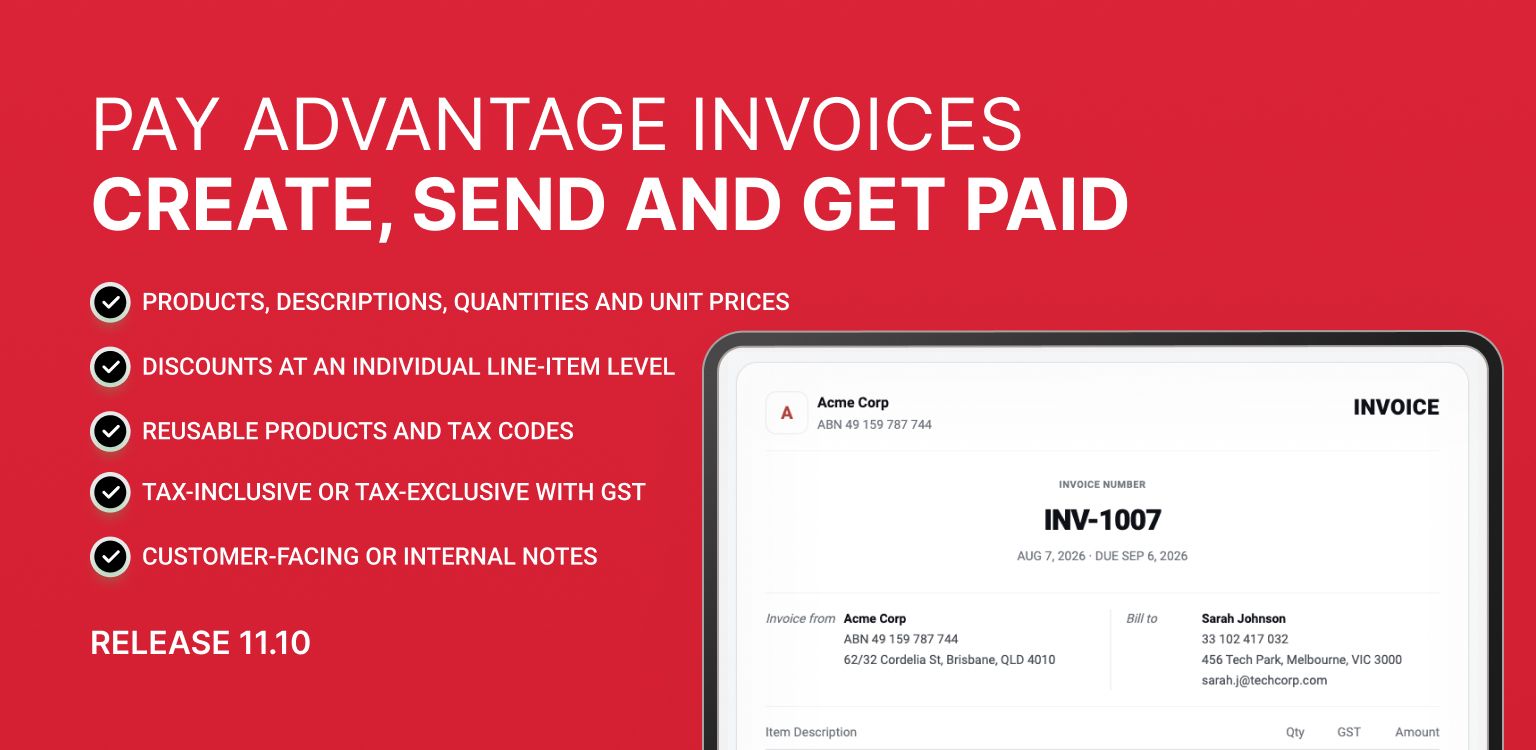
Pay Advantage Invoices - Create, Send and Get Paid

You can now create and send invoices directly from Pay Advantage. No Xero required.

Build an invoice, add your products or line items, send it straight to your customer, and get paid by Card or PayID through the same trusted Pay Advantage payment flow you already use.

Create invoices your way

Build invoices that suit your business, including:

  • Products, descriptions, quantities and unit prices

  • Discounts at an individual line-item level

  • Reusable Products and Tax Codes

  • Tax-inclusive or tax-exclusive pricing with GST automatically calculated

  • Customer-facing or internal notes

  • Invoice numbers, issue dates, due dates, references and external IDs

Make it easier for customers to pay

Once your invoice is ready, you can send it by email or SMS, share a payment link or provide a QR code for your customer to scan.

Customers can then pay securely by Card or PayID through a hosted invoice page.

Need more flexibility? You can also:

  • Payment Plans - Let customers pay an invoice off in installments, so a big bill doesn't turn into a bad debt.

    Discounts & Credits - Show your customers their discounts and credits to encourage payments and provide clearer billing.

    Attach Existing Payments - Match a payment you've already received to its invoice, so nothing gets double-handled at reconciliation.

    Virtual Terminal - Take a card payment over the phone and mark the invoice paid while the customer's still on the line.

    Bulk Invoice Payments - Collect against every outstanding invoice in one batch, instead of one at a time.

    One View of Every Invoice - See your Pay Advantage and Xero invoices side by side, process with the system that works for you.

Once the balance is paid, the invoice automatically completes. If a linked payment is later refunded or charged back, the invoice automatically reopens so your records stay accurate.

Spend less time chasing unpaid invoices

Pay Advantage can now help with the follow-up too.

See outstanding and overdue invoices at a glance, send automatic payment reminders before and after the due date, and bulk pay eligible invoices.

You can also choose to on-charge eligible fees to your customer.

If you regularly send invoices and then manually follow up payment, this one feature will save you hours.

Automatically Generate Invoices for Recurring Payments

As soon as a direct debit clears, your customer gets their paid invoice and receipt automatically. No manual sending, no follow-up questions.

When creating a Recurring Template, you can choose to:

  • Generate an invoice on settlement - Automatically creating the invoice as soon as the payment settles

  • Automatically send the invoice to your customer - Once the invoice is created, it will email your customer the invoice and receipt pair

New Direct Debits created from that template will automatically inherit your invoicing preferences.

Set it once and let Pay Advantage take care of the rest.

Let Smart Reminders Follow Up Unpaid Payment Requests

Still manually chasing customers after sending a Payment Request? You may not need to.

With Smart Reminders turned on, customers are 4 times more likely to pay, helping you get paid sooner without adding more follow-up work for your team.

Smart Reminders automatically send email and SMS reminders when a Payment Request remains unpaid and is still active.

You can also set a due date on your Payment Request, making it easy to see when payment is expected. If the due date passes without payment, Smart Reminders automatically adjust their wording to let your customer know their payment is now overdue.

Reminders are typically sent around days 3, 7, 13, 25 and 45, (if a due date is set a reminder will also be send 2 days before then another on the due date and also 1 day after payment is due) keeping your payment front of mind without your team having to remember to follow up.

The Smart Reminder fee will only charged when a reminder is actually sent. So you only pay if the customer needs a follow-up.

You remain in control and can:

  • Set a due date for your Payment Request

  • Enable or disable Smart Reminders for individual Payment Requests before the first reminder is due

Your applicable reminder fee can be viewed under your Subscription Plan and Rate Plan.

Send the request once and let Smart Reminders help with the follow-up.

Save on Fees - Encourage More Customers to Pay by PayID

This feature is only available if you have enabled PayID on your account

Want to reduce the cost of accepting higher-value payments? Smart PayID Redirect can help.

You can now encourage customers making larger payments to choose PayID instead of Card.

Set your preferred transaction threshold and, when a customer selects Card for a payment at or above that amount, Pay Advantage can display a customised message encouraging them to switch to PayID.

The customer still has the choice to continue paying by Card.

You decide:

  • Whether Smart PayID Redirect is turned on

  • The payment amount that triggers the prompt

  • What message your customer sees

For businesses accepting larger transactions, shifting even a portion of payments from percentage-based Card fees to PayID can help reduce overall payment processing costs.

Take Control of How Your Recurring Debit Plans Are Displayed

Put the plans you want customers to choose front and centre.

You can now control exactly how your public Direct Debit plans appear on your Payment Portal.

Under the new Template Settings area, simply drag and drop your plans into the order you want customers to see them.

You can also:

  • Show or hide individual plans

  • Mark a plan as Recommended

  • Choose the exact order plans appear

  • Reset changes before saving if you change your mind

Your first Recommended plan is automatically brought into focus when customers visit the page.

This gives you greater control over how you present your payment options and allows you to strategically position your preferred or best-value plan rather than relying on the previous automatic price-based ordering.

New API Endpoint: Create Direct Debits from Saved Templates

If you create Direct Debits through the Pay Advantage API, there’s now a faster and simpler way to set them up.

A new API endpoint allows you to create a Direct Debit directly from a saved subscription template. The template automatically applies the:

  • Payment amounts

  • Fees

  • Frequency

  • Terms

You simply provide the customer, payment account and scheduling or authorisation options.

This means your integration can use pre-configured templates rather than supplying the same plan details each time, helping to simplify your integration, improve consistency and create Direct Debits faster.

Need help integrating to our API? Call us today.

You can also access this feature directly through the Pay Advantage user interface. When creating a Direct Debit, simply select a saved template from the Direct Debit creation slider and the plan details will be automatically applied for you.

Whether you’re creating Direct Debits through the API or directly in Pay Advantage, you can now skip repetitive setup and get new Direct Debits running faster.

Start exploring what's new

These features are designed to help you get more from your Pay Advantage account, whether that’s getting invoices paid sooner, reducing manual follow-ups, lowering payment costs or making recurring payments easier to manage.

Not sure which features could make the biggest difference to your business? Our Support Team is here to help.

Give us a call on 1300 641 310 and we can talk you through the new features, help you identify which ones could benefit your business and show you how to get started.

Get in touch with our team today and start getting more from Pay Advantage.
Earlier updates